



axure强大的功能,可直接设计页面发布成网站,虽然axure提供了一些自定义资源方法的方法,但还不能达到完全控制的程序,因此通过不断的实验,以下方法可达到此目地。
前提
- axure版本为rp 9.0
- 只针对导出网页
样式自定义
导出设置
点击
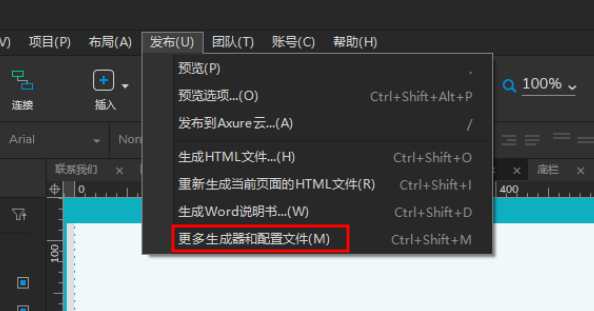
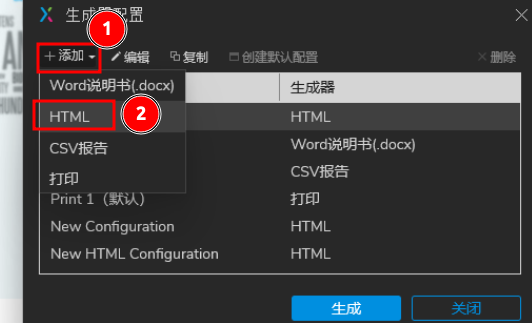
进入设置,添加一个自定义生成器
在此处设置自定义的css路径,可相对于导出后目录
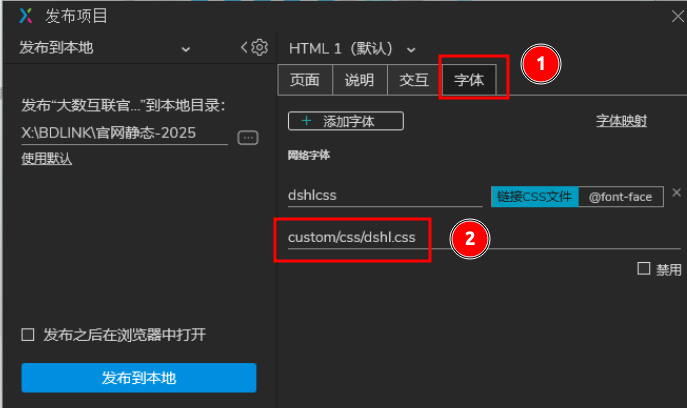
然后在发布的目录里,创建相应的目录与文件即可。
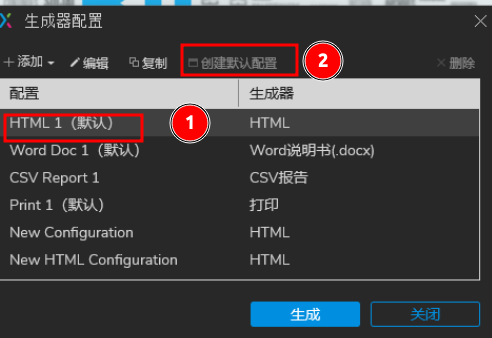
最好是将自建的生成器设置为默认,这样后续就不要手动选了
js脚本自定义
此处的js脚本自定义方法是通过修改axure默认的start.html模板来实现了,思路为备份start.html文件,以备后用,然后将此文件删除大部分内容,通过增加一个iframe转到你想要显示的页面,再通过js附加到自定义脚本的文件到显示的页面中。具体操作如下:
修改sart.html模板文件
此文件路径在当前操作的axure版本为:安装路径\Axure RP 9\DefaultSettings\Prototype_Files\start.html
备份后按需修改,以下是参考
<!DOCTYPE html>
<html xmlns="http://www.w3.org/1999/xhtml" xml:lang="en" lang="en">
<head>
    <title>Untitled Document</title>
    <meta http-equiv="X-UA-Compatible" content="IE=edge" />
    <meta http-equiv="content-type" content="text/html; charset=utf-8" />
    <meta name="viewport" content="width=device-width, initial-scale=1.0, user-scalable=no, viewport-fit=cover" />
    <meta name="apple-mobile-web-app-capable" content="yes" />
    <style>
        html,HTML,body,BODY{
            height:100%;
            width:100%;
            padding:0px;
            margin:0px;
        }
    </style>

    <script type="text/javascript">
        if (location.href.toString().indexOf('file://localhost/') == 0) {
            location.href = location.href.toString().replace('file://localhost/', 'file:///');
        }
    </script>
</head>
<body scroll="no" class="hashover" style="overflow: hidden;">

<iframe src="index.html" id="indexIframe" style="width:100%;height:100%;border:none"></iframe>

<!-- 9.0.0.3686 -->
<script src="resources/scripts/jquery-3.2.1.min.js"></script>
<script>
    let indexIframe = document.getElementById("indexIframe");
    indexIframe.onload = (event)=>{
        let indexWindow = indexIframe.contentWindow;
        console.log(event, indexWindow, indexWindow.document, indexWindow.$, indexWindow.onload)

        try {
            indexWindow.addEventListener('load', function() {
                console.log('iframe 内部页面已完成加载');
                var script = indexWindow.document.createElement('script');
                script.src = 'custom/css/dshl.js';
                script.onload = function () {
                    console.log('[Axure Plugin] 自定义行为脚本加载完成');
                };
                indexWindow.document.head.appendChild(script);
            });

            // 检查是否已经加载完成
            if (indexWindow.document.readyState === 'complete') {
                indexWindow.dispatchEvent(new Event('load'));
            }
        } catch (e) {
        console.error('跨域限制:', e);
        }

    }
</script>


</body>
</html>
在上述示例中,需要与样式处理一样,在发布的目录建好对的子目录与文件即可。可在此脚本中实现其它更复杂的处理。
评论区